
🔍 TL;DR:
This article outlines how to delegate, control and monitor access to your backup data in Veeam Backup for M365 by:
🔒 Using RBAC & MFA for the VB365 console
🚫 Limiting restore portal access by user scope
➡️ Forwarding restore logs to syslog/SIEM
📨 Sending restore alerts via the audit API
Veeam Backup for Microsoft 365 protects data across Exchange Online, OneDrive, SharePoint & Microsoft Teams for your users & departments within a Microsoft 365 organization. Within this data, businesses will often store sensitive or confidential company information related to HR, finance or senior management, requiring strict access controls to be implemented so only authorized personnel have access to it.
This raises the challenge as to who within the company should be trusted to manage this data and recover data from the backup. Typically this figure of trust may be your system administrator, backup administrator, or service desk however in granting them unrestricted access means they have access to EVERY users M365 data in your organization, including those more sensitive users such as Finance, HR & senior management and therefore it’s important that you both monitor and restrict access correctly to ensure that the position of trust isn’t abused. To overcome this challenge, there are a few different controls you can implement to restrict and monitor restore activity and configuration changes performed from the Veeam Backup for M365 console and self-service restore portal.
Monitoring restore activity through audit logs
Veeam Backup for M365 generates log files locally for all operational activity including restores which is ideal for audit purposes. Below is a snippet of a Veeam Explorer Log for a restore I performed in a lab environment. Within the logs folder for data retrieval (%ProgramData%\Veeam\Backup365\Logs\<organization_name>)
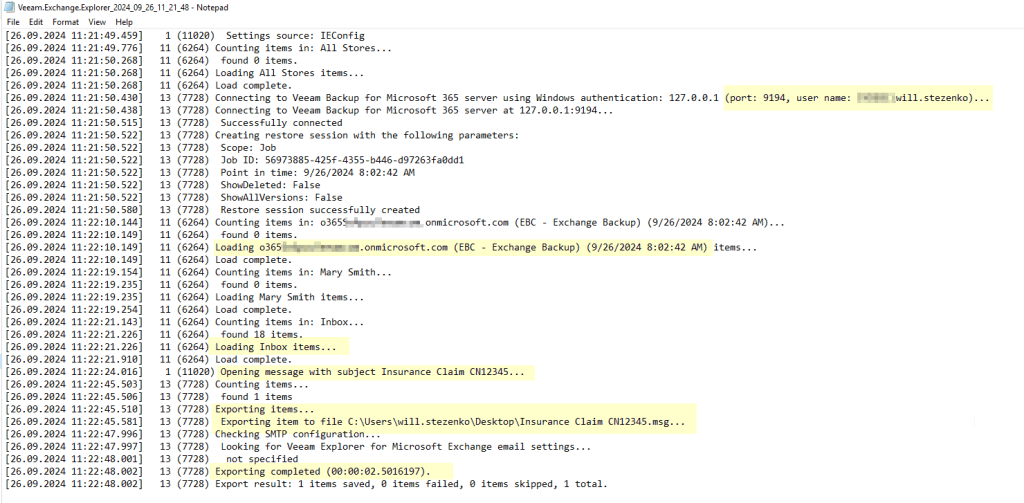
A separate log file is written for each user performing or attempting restores, which includes the client IP, username and details of which item from backup has been viewed, restored or exported to file.
If you have a SIEM or syslog server within your network you can forward the Veeam Explorer & Restore Portal logs to your syslog. Once configured you can setup the necessary alerts for restores and data retrieval attempts for sensitive accounts containing confidential data.
Setting up alerts for restores
In addition to logs, there is an API post request which can be used to configure email audit notifications for restore activity as documented here and here in the user guide. The audit API can be configured to alert specific users such as your security team or senior management via email for any restores of data for specific mailboxes, groups or users. It’s worth noting that this control is hidden from the UI and only configurable through the API therefore once enabled it would prove difficult for someone to be aware of this configuration setting, reconfigure or disable it.
Once the API is configured, besides email alerts for restore activity, if someone were to try change these settings, you can fall back to the administration logs being sent to your syslog server to determine whether a setting has been changed via API and by who. There are many different methods which can be used to call a Veeam API, in this instance for a one-time API call to perform the configuration, you can leverage a light-weight API client tool called Postman. To understand how to complete this process, I have documented the steps in a sub-post available here (link coming soon).
Restricting permissions for approved administrators & restore operators
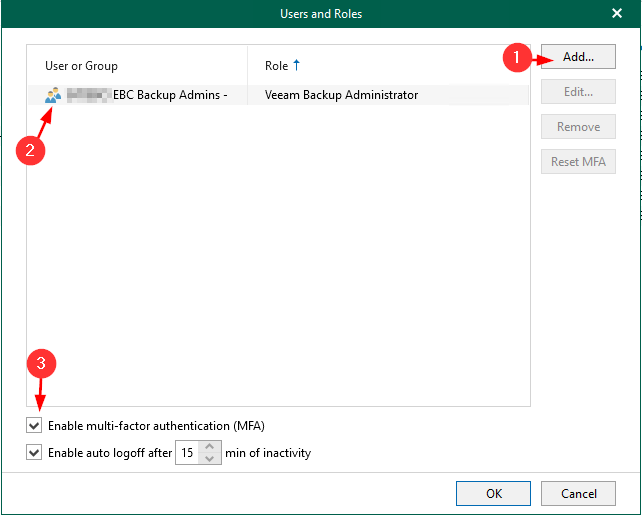
In V8 of VB365, Veeam introduced Role Based Access Control for the VB365 console. Initially, the only role available to be assigned is backup administrator, of which this role has permissions to configure everything in the product and perform all restores. The purpose of this, is to prevent any other administrative user from being able to open the application console and perform activities.
In Version 8.1 of the product, Veeam introduced Multi Factor Authentication which further strengthened this security control, making sure that even if someone were to reset the password of an approved administrator to circumvent the RBAC, they would also need that users registered MFA device to complete the login process.
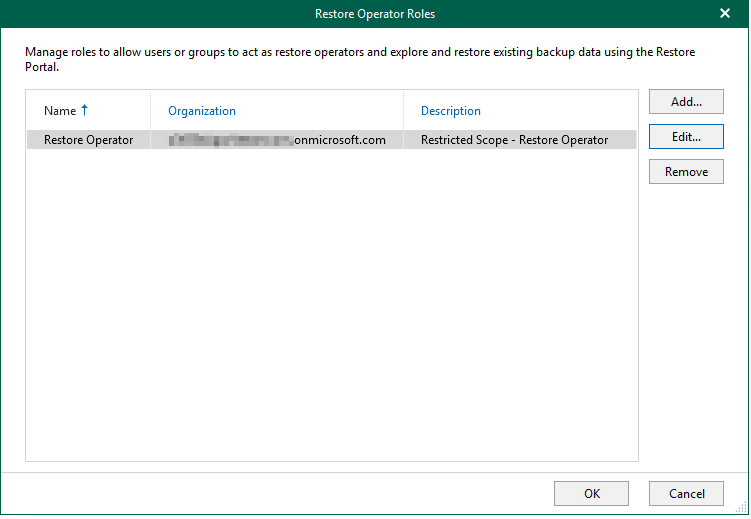
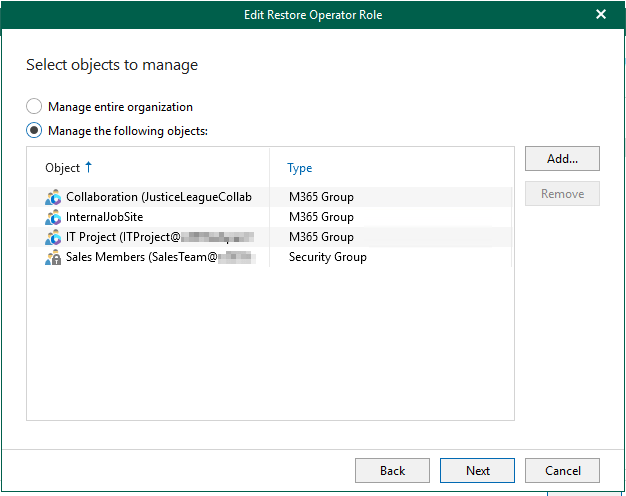
For restores, the Self-Service Restore Portal provides an option to assign a restore operator role to a user or groups of users and with this role you can specify which items are in scope and available for restore (e.g. exclusion of the CEO or Finances mailboxes). Assigning the restore operator role to a user limits the scope of access to data they can restore, as well as where they can restore that data to.

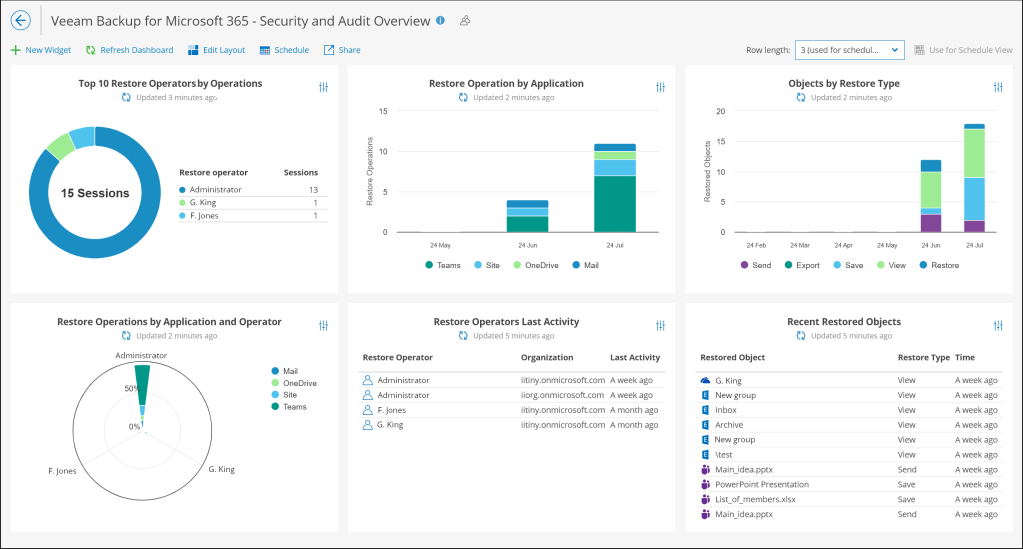
VeeamONE – Veeam Backup for Microsoft 365 – Security and Audit Overview
Starting with VeeamONE 12.2 & Veeam Backup for M365 V8, Veeam introduced new capabilities focused on monitoring the security & auditing of all restore activities performed across all tenancies managed in your Veeam Backup for 365 environment. The capabilities come in the form of a restore audit dashboard and a restore activity alarm.
The dashboard provides great ‘at a glance’ visibility to oversea all restore activity taking place within the environment, this information is visually broken down so you can see who is the organization is performing the most restores, what application is being restored most often as well as the type of restore which lets you know whether your restore operators are viewing, exporting or just directly restoring data for your 365 tenant.
The alarm allows for you to configure an alert based on when a particular type of restore takes place (e.g specific restore operator, restore target or type of restore . The VeeamONE alert can be configured to notify you via the dashboard, email or even trigger a remediation action such as a custom script (E.g to alert management & disable an account or revoke access) when this specific criteria is met and the occurrence of this event is logged to the VeeamONE database for future reference.

Conclusion
To summarize, the recommended approach is to restrict access and monitor backup, restore and configuration activity on your Veeam Backup for Microsoft 365 Server by doing the following:
- Assign the Backup Administrator role only to administrators who are authorized to make configuration changes and perform restores across your entire Microsoft 365 tenancy.
- Restrict Service Desk staff or non-senior engineers to only using the restore portal to perform restores, with the appropriate scopes defined so they can only perform restores for standard users (e.g non sensitive mailboxes) and prevent the viewing or download of user’s backup data.
- Implement syslog monitoring by forwarding the relevant log files to ensure that all restore activity & configuration changes on the server are recorded regardless of the users role.
- Set-up email alerts through the API for restores of sensitive data , of which they can be sent to the security team, an audit mailbox or senior management.
- Implement VeeamONE & leverage the data in the Security and Audit Overview dashboard to monitor restore access across your environment.
How this looks in real life – Example scenario
- You have assigned your service desk the role of performing restores across your Microsoft 365 tenancy with the exception of sensitive mailboxes/users such as finance, HR & senior management.
- Your backup administrator is approved to manage backups and also perform restores of all data in the tenancy therefore are listed as an backup administrator in the Role Based Access Control, with MFA enabled of course.
- Your system engineer team take care of maintaining the server, application & operating system updates but do not need to be assigned assigned a role in Veeam Backup for Microsoft 365.
Day to day your service desk will take care of any restore requests for standard users (e.g non-sensitive). Additionally, you can provide your end users the ability to perform self-service restore. In a situation where your service desk receive a request to restore data for a sensitive mailbox, they escalate the request to your backup administrator to complete the restore process. All restore activities for this request are logged to your syslog/SIEM server and a log of the event is also sent to the specified audit/notification mailbox for review.
By implementing these controls, you establish a robust framework for securing and monitoring data access and restore operations in Veeam . Less senior IT team members, such as L1 Service Desk staff or similar are restricted to restoring data only for standard users within defined scopes, minimizing the risk of unauthorized access to sensitive information. Critical actions such as viewing or restoring data from backups are reserved for approved administrators, and every activity is meticulously logged in VeeamONE or to your syslog/SIEM server and sent to a dedicated audit mailbox for a comprehensive activity logging & oversight. This layered approach not only enforces the principle of least privilege but also ensures that all restore and configuration activities are fully traceable, helping your organization meet compliance requirements and maintain trust in your data protection processes.
 StezTech